Difference between revisions of "PFS HarnessGag"
m |
m |
||
| Line 53: | Line 53: | ||
<br><hr><br> | <br><hr><br> | ||
<h1><p style="text-align:center; color: #fe5656;font-size: 60px">2. Harness gag features</p></h1> | <h1><p style="text-align:center; color: #fe5656;font-size: 60px">2. Harness gag features</p></h1> | ||
| − | <h2><p style="text-align:center; color: #fe5656;font-size: 40px"> 2.1 | + | <h2><p style="text-align:center; color: #fe5656;font-size: 40px"> 2.1 Gags types</p></h2> |
<p>You can select up to 5 differents gags from the gag menu.</p> | <p>You can select up to 5 differents gags from the gag menu.</p> | ||
<gallery> | <gallery> | ||
Revision as of 07:39, 9 May 2023
Contents

[PFS] Harness gag v1
The [PFS] Harness gag is a bondage gear (not rigged and compatible to any head) to restrict your talk and view, mostly dedicated to ponyplay, it can be used in many other disciplines, you will be able to:
- lock/unlock with RLV or RLVa
- restrict your ability to talk with 5 gag levels plus full silenced
- use 5 gag types (ball, bit, cock, holed ball & ring)
- switch simple ring gag to complex ring gag for the best adjustment
- leash with auto turn and auto TP to leash holder
- apply view masks following style and color of the harness gag
- show/hide accessories (ears, blinders, tag or lashes)
- use RL/SL timer
- colorize & texture over menu, accessible by both user and keyholder
- work with RLV & RLVa, auto switch when locked
- make and add your own tag logo with integrated tag UV
- add your own mask texture
- add additionnal scripts for public, PFS access
- add your own access script (example is provided)

Mouselook will be added in next update!
1. Generalities
This bondage gear is the result of the cooperation with Filly Heartsong who did the mesh design. We both put together our long experience in mesh design and scripting to provide you an unique gear. Because we care we are open to listen all your comments and suggestions, as long it will help to get a better product!
1.1 RLV
As a viewer standard, RLV restrictions are filtered to the object UUID and if your object uses same restrictions for several functions, you may run into trouble and the result may look a way different than expected. Thay's why RLV, here, is managed to the script level. You can have several scripts triggering restrictions w/o any interactions between them. You can easily follows the object restrictions table from the RLV menu.
Both RLV and RLVa are supported here but for some special features like screen overlay an addition attachement is required for RLV users. Even if most of us uses RLVa viewers today we still need to make things compatible to previous standards.
1.2 Access
The menu access is build in an inovative way. As standard, everyone can access the menu, with different access levels. Access levels are:
- public
- locker
- keyholder
- selftouch
Depending on the lock state of the object, you may get different access levels (they are cumulable) which allows you to do things or not. The not allowed functions are strikethrough but the positive side is you can still read every parameter and setting, including the user.
The menu is mono user but the keyholder has always the priority to access it.
You can access it using the command line over channel 7, just hit /7##gag to get access to the main menu of the object. Replace ## with the user 2 first letters of the user name.
The use of the API allows you to override the actual keyholder, this will help you to implement your own access list from wherever you want. You can implement "key grabbing" scripts as much you want they are asked one after the other. For more info look at the included public access script "plug.access.public".
1.3 Configurable
The object includes notecards to configure it, you can modify them at your own risk:
- logo: list of textures for the tag logo.
- maskenv: list of extra masks textures (if you want to add some more) and list of the EEP environment presets.
1.4 API
Objects you cannot mod are no fun, that's why you will find here an integrated API that will allows you make your own key grabbing script. plug.access.public is a script, full mod and documented, to make your own.
1.5 Integrated help
To make it accessible and easy to use, the object menus have a "help" feature to stream in your chat window some general informations regarding the actual menu displayed to help you to understand what does every buttons.
1.6 Truekey
The only way to unlock the object is the use of the key held by the keyholder. In case you are stuck or the keyholder not showing back you can, if seted up previously, use the Truekey feature to get unlocked by everyone having the key password. You can access it, set it up and use it fromt he "Tools" menu.
2. Harness gag features
2.1 Gags types
You can select up to 5 differents gags from the gag menu.
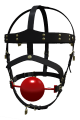
ball gag
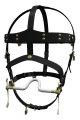
bit
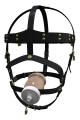
cock
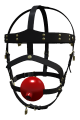
holed ball
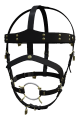
ring gag


You can easily adjust the gags to your head by editing the object.
